Customer Onboarding: Your First Impression Is a Patchwork of Tools
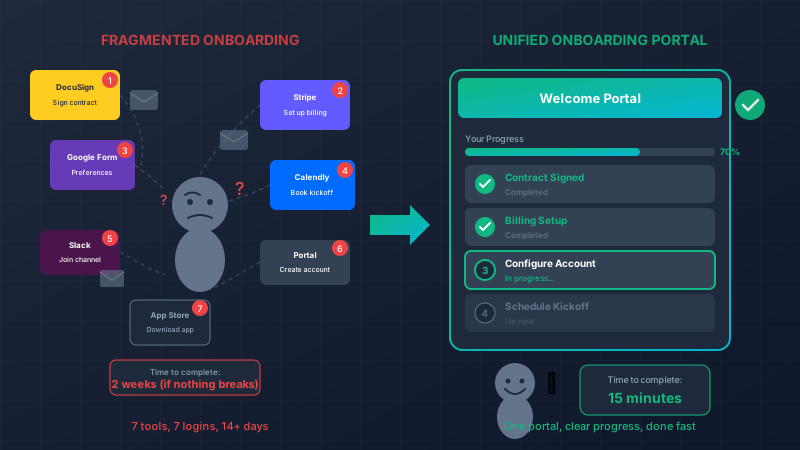
You just closed a new customer. Congratulations! Now begins the onboarding process:
- “Check your email for a DocuSign link to sign the contract”
- “Once that’s done, you’ll get a separate email from Stripe to set up billing”
- “Then create an account in our portal—I’ll send you that link next”
- “Fill out this Google Form with your configuration preferences”
- “Schedule your kickoff call using this Calendly link”
- “Join our Slack channel for support—invitation coming separately”
- “Oh, and download our app from the App Store”
Seven different systems. Seven different logins. Seven different interfaces. Seven chances for something to go wrong.
Your customer’s first experience with your company is chaos.
The First Impression Problem
You never get a second chance at a first impression. That’s not just a cliché—it’s backed by data:
- 86% of customers say they’d pay more for a better customer experience
- Customer churn is highest in the first 90 days
- The effort required to onboard directly predicts long-term satisfaction
When your onboarding is a scavenger hunt across multiple platforms, you’re telling customers: “We’re not organized. Working with us will be complicated. Good luck figuring it out.”
That’s not the message you want to send.
Where Patchwork Onboarding Fails
Let’s trace a typical B2B customer through fragmented onboarding:
Day 1: Customer receives DocuSign contract. Signs it. Waits.
Day 2: Stripe invoice arrives. Customer isn’t sure if this is legit (different sender, different branding). Delays payment to verify.
Day 3: Your team follows up about payment. Customer explains confusion. Finally pays.
Day 4: Portal invitation sent. Customer creates account. Forgets which email they used for the contract.
Day 5: Onboarding form arrives. Customer fills it out, but makes a mistake. No way to correct it—has to email you.
Day 6: Calendly link for kickoff call. But the available slots don’t show their timezone correctly. Emails back and forth to schedule manually.
Day 8: Finally, kickoff call happens. Half of it is spent re-explaining things the customer already read in various emails.
Day 10: Customer needs help. Was it Slack? Email? The portal? They try all three, get responses in different places.
Two weeks in, and the customer is already frustrated. They haven’t even started using your actual product yet.
What Customers Actually Want
When we talk to customers about onboarding, we hear the same things:
“I just want one place to go.”
“Tell me what to do next. Don’t make me figure out the sequence.”
“Stop asking me for the same information twice.”
“I shouldn’t need a spreadsheet to track my own onboarding.”
The bar isn’t that high. Customers want clarity, simplicity, and a sense of progress.
The Unified Onboarding Portal
Custom software lets you build what customers actually want: a single destination that guides them through everything.
defmodule CustomerOnboarding do
  def get_onboarding_status(customer_id) do
    customer = Customers.get!(customer_id)

    %{
      customer: customer,
      steps: [
        %{name: "Sign Contract", status: contract_status(customer)},
        %{name: "Set Up Billing", status: billing_status(customer)},
        %{name: "Configure Account", status: config_status(customer)},
        %{name: "Schedule Kickoff", status: kickoff_status(customer)},
        %{name: "Complete Training", status: training_status(customer)}
      ],
      current_step: determine_current_step(customer),
      percent_complete: calculate_progress(customer)
    }
  end
end
The customer logs into one portal and sees:
- ✅ Contract signed
- ✅ Billing set up
- 🔄 Configure your account (You are here)
- ⬜ Schedule kickoff call
- ⬜ Complete training
No hunting through emails. No wondering what’s next. No confusion about what they’ve already done.
Everything In One Place
A unified portal handles all onboarding touchpoints:
Contracts: Embedded e-signature, not a separate DocuSign experience.
defmodule ContractSigning do
  def render_contract(customer) do
    %{
      document: generate_contract(customer),
      signature_fields: required_signatures(customer),
      callback: &complete_contract_step/1
    }
  end

  def complete_contract_step(customer) do
    # Automatically advance to next step
    Onboarding.advance_step(customer, :billing)
  end
end
Billing: Payment collection built into the flow, branded consistently.
Configuration: Forms that remember what you’ve already told them, validate in real-time, and allow corrections.
Scheduling: Calendar integration that shows correct timezones and available slots, books automatically.
Communication: In-portal messaging so nothing gets lost in email threads.
The Progress Bar That Changes Everything
Something magical happens when customers can see their progress:
defmodule OnboardingProgress do
  def calculate(customer) do
    steps = all_steps()
    completed = Enum.count(steps, &step_complete?(customer, &1))

    %{
      completed: completed,
      total: length(steps),
      percentage: round(completed / length(steps) * 100),
      estimated_time_remaining: estimate_remaining_time(customer)
    }
  end
end
“You’re 60% complete! About 15 minutes left.”
That simple indicator:
- Creates momentum (people want to reach 100%)
- Sets expectations (they know how much is left)
- Reduces support questions (“Where am I in the process?”)
- Makes completion feel achievable
Automatic Nudges That Don’t Annoy
When onboarding stalls, you need to follow up. But how do you follow up without being pushy?
With fragmented tools, someone has to manually track who’s stuck and send emails. That’s error-prone and inconsistent.
With custom software, intelligent nudges happen automatically:
defmodule OnboardingNudges do
  use Oban.Worker

  def perform(%{args: %{"customer_id" => id}}) do
    customer = Customers.get!(id)
    stuck_step = Onboarding.stuck_on(customer)

    if stuck_step && hours_stuck(customer, stuck_step) > 24 do
      case stuck_step do
        :contract ->
          send_contract_reminder(customer)

        :billing ->
          send_billing_help(customer)
          # Maybe they had a payment issue?

        :configuration ->
          # Offer a quick call to help
          offer_configuration_assistance(customer)
      end
    end

    :ok
  end
end
The nudges are contextual. Stuck on billing? Maybe offer alternative payment methods. Stuck on configuration? Maybe offer a quick screen-share to help. Stuck on scheduling? Maybe proactively suggest specific times.
Helpful, not spammy.
Self-Service That Actually Works
Most onboarding questions are the same:
- “What information do I need for step 3?”
- “Can I change something I already submitted?”
- “How do I add another user to our account?”
- “When will someone contact me?”
A unified portal can answer these before they become support tickets:
defmodule OnboardingHelp do
  def contextual_help(customer) do
    current_step = Onboarding.current_step(customer)

    %{
      faqs: faqs_for_step(current_step),
      video_guide: video_for_step(current_step),
      chat_available: support_online?(),
      estimated_response: estimated_response_time()
    }
  end
end
Right next to the form asking for their billing info, there’s a tooltip: “We accept Visa, Mastercard, and ACH transfers. Need to pay by invoice? Click here to request.”
Answer questions before they’re asked.
The Internal Benefits
A unified onboarding portal doesn’t just help customers—it transforms your internal operations:
Complete visibility: Which customers are stuck? Where do they drop off? How long does each step actually take?
defmodule OnboardingAnalytics do
  def bottleneck_report do
    %{
      avg_time_per_step: calculate_step_times(),
      drop_off_points: identify_drop_offs(),
      completion_rate: overall_completion_rate(),
      stuck_customers: currently_stuck_customers()
    }
  end
end
Proactive intervention: Your customer success team can see a dashboard of everyone currently onboarding, sorted by risk of stalling.
Consistent experience: Every customer gets the same polished experience, regardless of which salesperson closed them or which CS rep is assigned.
Scalability: Onboard 10 customers or 100 with the same effort. The system does the work.
Real Results: The Numbers
Companies that unify their onboarding typically see:
| Metric | Before | After |
|---|---|---|
| Time to complete onboarding | 14 days | 4 days |
| Support tickets during onboarding | 8 per customer | 2 per customer |
| Onboarding completion rate | 72% | 94% |
| Customer satisfaction (NPS) | +12 | +47 |
| Early churn (first 90 days) | 18% | 6% |
The impact on early churn alone often justifies the entire investment.
The Ripple Effects
Great onboarding doesn’t just reduce churn—it creates advocates:
Faster time-to-value: Customers start seeing ROI sooner, which reinforces their purchase decision.
Word of mouth: “Their onboarding was so smooth” is exactly what you want customers telling their peers.
Reduced support load: Questions answered proactively don’t become tickets.
Upsell foundation: Customers who had a great onboarding experience are more receptive to expansion conversations.
Reference customers: Happy customers say yes when you ask for references or case studies.
Building Your Unified Portal
The technical implementation is straightforward with modern tools like Phoenix LiveView. The harder work is designing the experience:
-
Map the current journey: Document every touchpoint, every email, every tool involved today.
-
Identify friction points: Where do customers get stuck? Where do they ask questions? Where do they drop off?
-
Design the ideal flow: What’s the minimum viable onboarding? What can be automated? What can be eliminated?
-
Build progressively: Start with the highest-friction step and prove the concept.
-
Measure and iterate: Track completion times, drop-off points, and satisfaction scores. Keep improving.
The Competitive Advantage
Here’s something your competitors probably haven’t figured out: onboarding is a product.
When your onboarding is noticeably better, it:
- Differentiates you in sales demos
- Reduces the perceived risk of switching to you
- Creates immediate positive sentiment
- Sets the tone for the entire relationship
In competitive deals, “Our onboarding takes 3 days, not 3 weeks” can be the deciding factor.
Stop Making Customers Work So Hard
Your customers chose you because they believe you can solve their problem. Don’t make them fight through a maze of disconnected tools before they can experience that value.
A unified onboarding portal tells them: “We’ve got this. We’ll guide you through. You made the right choice.”
Let’s talk about transforming your customer onboarding from a patchwork of tools into a seamless experience that wins loyalty from day one.
The best customers aren’t just satisfied—they’re delighted. And delight starts with the very first interaction after they say yes.
Live Demo: Real-Time Inventory
This interactive component demonstrates how we combine Phoenix LiveView for real-time updates with Svelte for smooth client-side interactions. Try it out – in a production app, these changes would sync instantly across all connected users.