Your Team Is Drowning in Notifications. Here's the Fix.
Ping. Ding. Buzz. Chime.
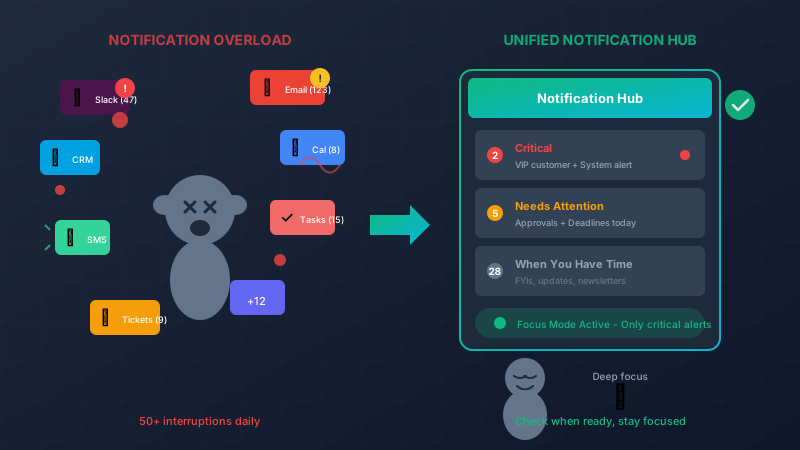
Your morning starts with 47 unread emails, 23 Slack messages across 8 channels, 5 notifications from your project management tool, 3 alerts from your CRM, and a partridge in a pear tree.
By 10am, you’ve “worked” for two hours but accomplished nothing of substance. You’ve been too busy reacting to ever start doing.
Sound familiar? You’re not alone.
The Attention Tax
Every notification costs you more than the seconds it takes to read. Research shows it takes an average of 23 minutes to fully regain focus after an interruption. Let’s do the math:
- 50 notifications per day (conservative estimate)
- Even if only 10 actually break your focus
- 10 × 23 minutes = 3.8 hours of lost productivity daily
That’s nearly half your workday gone—not to actual work, but to recovering from interruptions.
The Multi-App Nightmare
Here’s what a typical knowledge worker juggles:
- Email – External communication, internal FYIs, automated alerts
- Slack/Teams – Instant messages, channel updates, @mentions
- Project management – Task assignments, due dates, comments
- CRM – Lead alerts, deal updates, customer activity
- Support tickets – New issues, escalations, responses
- Calendar – Meeting reminders, schedule changes
- Finance tools – Approval requests, expense alerts
- And more… – Each tool demanding attention
Each app thinks it’s the most important. Each one defaults to notifying you about everything. The result? Nothing feels important because everything is screaming for attention.
The Real Problem: No Prioritization
Your email client doesn’t know that a message from your biggest customer is more urgent than a newsletter. Slack doesn’t know that a message about a production outage matters more than someone sharing a meme in #random.
These tools notify you about everything equally, leaving you to do the mental work of sorting signal from noise—hundreds of times per day.
What If There Was One Place to Look?
Imagine starting your day with a single dashboard that shows:
- 🔴 Critical – Production alert, VIP customer escalation (2 items)
- 🟠 Needs attention today – Approval request, deadline reminder (5 items)
- 🟡 When you have time – Team updates, FYI messages (12 items)
- ⚪ Archived – Already handled or informational only
No more checking 8 different apps. No more wondering if you missed something important buried in a noisy channel. Just one place with smart prioritization.
Building an Intelligent Notification Hub
With custom software, we can create exactly this. Here’s how it works:
defmodule NotificationHub do
  def process_incoming(notification) do
    notification
    |> classify_source()
    |> analyze_content()
    |> check_sender_importance()
    |> apply_user_rules()
    |> assign_priority()
    |> route_appropriately()
  end

  defp assign_priority(notification) do
    cond do
      notification.is_production_alert -> :critical
      notification.from_vip_customer -> :critical
      notification.requires_approval -> :high
      notification.has_deadline_today -> :high
      notification.is_direct_mention -> :medium
      true -> :low
    end
  end
end
The system learns what matters to your business:
- Messages from your top 10 customers? Always surface immediately.
- Alerts from your monitoring system? Critical priority.
- Weekly newsletter from a vendor? Archive automatically.
- Slack messages in #general? Batch for end of day.
Real-Time, But Not Real-Time Interruptions
Here’s the magic of Phoenix LiveView—your notification hub updates in real-time without you having to refresh, but you control when you look at it.
defmodule NotificationLive do
  use Phoenix.LiveView

  def mount(_params, session, socket) do
    if connected?(socket) do
      Phoenix.PubSub.subscribe(MyApp.PubSub, "notifications:#{session.user_id}")
    end

    {:ok, assign(socket, notifications: load_notifications(session.user_id))}
  end

  def handle_info({:new_notification, notification}, socket) do
    # Update the UI silently - no ping, no popup
    # The count updates, but you're not interrupted
    {:noreply, update(socket, :notifications, &[notification | &1])}
  end
end
Critical items can still break through with a real alert. But the other 90%? They accumulate quietly, waiting for when you decide to check.
The Difference: Interrupt-Driven vs. Intention-Driven
Interrupt-driven work:
- Check email because it dinged
- Check Slack because you saw the red dot
- Check your phone because it buzzed
- Never quite sure if you’re missing something
- Constant low-grade anxiety
- Shallow work, frequently interrupted
Intention-driven work:
- Check your unified dashboard at planned intervals
- Process notifications in batches
- Know that critical items will find you
- Deep work without background worry
- Calm, focused productivity
Smart Routing: The Right Info to the Right People
A unified notification system isn’t just about reducing noise for individuals—it’s about getting information to the right person, fast.
defmodule NotificationRouter do
  def route(notification) do
    case notification.type do
      :customer_complaint ->
        if notification.customer.tier == :enterprise do
          send_to([:account_manager, :support_lead])
        else
          send_to([:support_team])
        end

      :payment_failed ->
        send_to([:billing_team])
        if notification.amount > 10_000, do: send_to([:finance_director])

      :inventory_low ->
        send_to([:purchasing])
        if notification.item.is_critical, do: send_to([:operations_manager])
    end
  end
end
No more “I didn’t see that email” or “I thought someone else was handling it.” The system ensures the right eyes see the right information.
Features That Transform Your Day
A custom notification hub can include:
Smart Batching Group related notifications together. Instead of 15 pings about one Slack thread, get one summary.
Quiet Hours Automatically hold non-critical notifications during focus time, meetings, or after hours.
Escalation Rules If something critical isn’t acknowledged in 15 minutes, escalate to the backup person.
Daily Digest End-of-day summary of everything that happened, so you can unplug with confidence.
Search Across Everything One search box to find that notification from three weeks ago, regardless of which app it came from.
The ROI of Focus
Let’s be conservative. Say a unified notification system saves each employee just 1 hour per day in reduced context-switching and faster information finding:
- 10 employees × 1 hour × $40/hour = $400/day
- $100,000/year in recovered productivity
And that’s just the direct time savings. The indirect benefits are even bigger:
- Better decisions from less overwhelm
- Faster response to critical issues
- Lower stress and burnout
- Improved deep work capacity
Start Taking Back Your Attention
Your attention is your most valuable asset. Right now, you’ve given a dozen different SaaS products permission to interrupt you whenever they want, for whatever reason they deem worthy.
Take that power back.
Let’s talk about building a notification system that works for your brain, not against it. We’ll help you design a solution that surfaces what matters and silences what doesn’t.
The irony isn’t lost on us—we could send you a notification about this article. Instead, we’ll trust that you found it when you were ready to read it. That’s the point.
Live Demo: Real-Time Inventory
This interactive component demonstrates how we combine Phoenix LiveView for real-time updates with Svelte for smooth client-side interactions. Try it out – in a production app, these changes would sync instantly across all connected users.