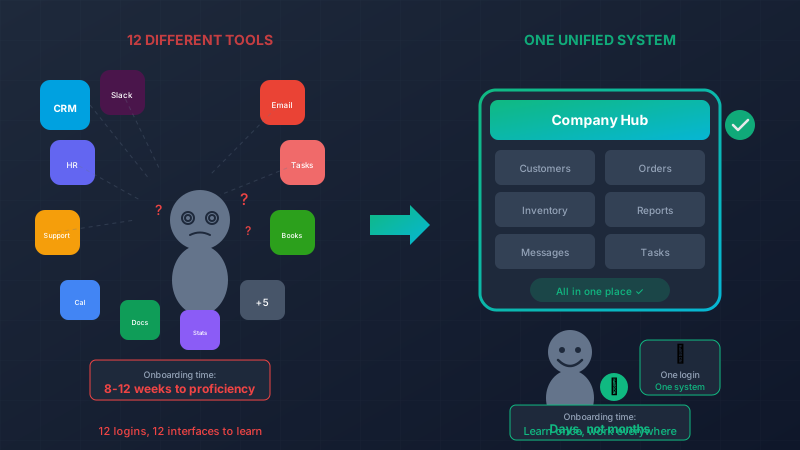
Stop Training Employees on 12 Different Tools
It’s your new hire’s first week. They’re eager, motivated, ready to contribute. So you sit them down and say:
“Okay, first you’ll need to learn Salesforce for CRM. Then HubSpot for marketing. Zendesk for support tickets. Asana for project management. Slack for communication. Google Workspace for documents. QuickBooks for expenses. Gusto for HR stuff. Oh, and we have a few internal spreadsheets I’ll share with you…”
Watch their enthusiasm deflate in real-time.
Every tool you add to your stack is a training burden. And that burden compounds with every new hire, every role change, every “we switched to a new platform” announcement.
The Hidden Cost of Tool Sprawl
Let’s quantify this. A typical mid-sized company uses 80-120 different SaaS applications. Even if an individual employee only touches 10-15 of them, that’s still:
- 10+ logins to remember (or password reset constantly)
- 10+ interfaces to learn (each with its own logic and quirks)
- 10+ places to check for information
- 10+ potential points of confusion
Now multiply that by training time:
| Tool Type | Typical Training Time | Real Proficiency |
|---|---|---|
| CRM (Salesforce, HubSpot) | 4-8 hours | 2-4 weeks |
| Project Management | 2-4 hours | 1-2 weeks |
| Support Platform | 2-4 hours | 1-2 weeks |
| Accounting Software | 4-8 hours | 2-4 weeks |
| Internal Processes | 8-16 hours | 4-8 weeks |
A new customer service rep might spend their entire first week just learning tools—before they help a single customer.
The Compounding Problem
It’s not just initial training. Tool sprawl creates ongoing friction:
Context switching: “Wait, is that information in Salesforce or HubSpot? Let me check both…”
Inconsistent interfaces: “In Asana, you click here to complete a task. In Monday, you click there. In Jira, you do this other thing entirely.”
Knowledge silos: “Ask Sarah, she’s the only one who really knows how to use that system.”
Update fatigue: “They changed the interface again? I just figured out the old one!”
Every minute spent navigating between tools or relearning updated interfaces is a minute not spent on actual work.
The Customer Service Rep Test
Here’s a thought experiment. Your customer service rep gets a call:
With your current tool stack:
- Look up customer in CRM (Tab 1)
- Check their order history in e-commerce platform (Tab 2)
- Review support ticket history in Zendesk (Tab 3)
- Check shipping status in fulfillment system (Tab 4)
- Look for notes in shared spreadsheet (Tab 5)
- Process refund in payment platform (Tab 6)
- Update CRM with call notes (back to Tab 1)
- Close ticket in Zendesk (back to Tab 3)
With a unified custom system:
- Look up customer (everything they need is on one screen)
- Process refund (one click)
- Add notes (done, automatically logged everywhere)
Same task. Dramatically different experience. One approach requires training on 6 different tools and mastering the workflow between them. The other requires learning one system that makes sense.
What “One System” Actually Looks Like
We’re not talking about cramming every feature into a confusing mega-app. We’re talking about building software that matches how your team actually works.
defmodule CustomerServiceDashboard do
  def load_customer_view(customer_id) do
    %{
      # Everything on one screen
      customer: Customers.get_with_details(customer_id),
      orders: Orders.recent_for_customer(customer_id),
      tickets: Support.history_for_customer(customer_id),
      shipping: Fulfillment.active_shipments(customer_id),
      notes: Notes.for_customer(customer_id),

      # Actions available right here
      available_actions: [:refund, :reship, :escalate, :add_note]
    }
  end
end
The rep sees one screen with everything they need. They don’t need to know that orders come from Shopify, shipping from ShipStation, and payments from Stripe. The system handles those integrations invisibly.
They learn one interface. They become productive fast.
The Onboarding Transformation
We worked with a company that tracked their customer service onboarding metrics before and after consolidating tools:
Before (8 different tools):
- Time to first independent call: 3 weeks
- Full proficiency: 8-12 weeks
- Training materials: 47 pages across 8 guides
- Trainer time per new hire: 20 hours
- New hire frustration level: High
After (unified custom system):
- Time to first independent call: 4 days
- Full proficiency: 3-4 weeks
- Training materials: 12 pages, one guide
- Trainer time per new hire: 6 hours
- New hire frustration level: “This actually makes sense”
That’s not a marginal improvement. That’s a 75% reduction in time-to-productivity.
Beyond Customer Service
This applies to every role:
Sales reps shouldn’t need to master Salesforce, LinkedIn Sales Navigator, Outreach, Gong, and your internal pricing spreadsheet separately. They should have one place to manage their pipeline, reach out to prospects, and close deals.
Operations managers shouldn’t switch between inventory systems, shipping platforms, vendor portals, and forecasting spreadsheets. They should see their entire operation in one view.
Finance teams shouldn’t reconcile data between accounting software, expense tools, payroll systems, and billing platforms. The numbers should already match because they came from the same source.
The “We Switched Platforms” Problem
Here’s another hidden cost of tool sprawl: migration trauma.
Every couple of years, you evaluate your stack. Salesforce is getting expensive, so you look at HubSpot. Asana isn’t cutting it, so you consider Monday. Each switch means:
- Data migration headaches
- Retraining everyone
- Lost productivity during transition
- Workflows that no longer work
- Institutional knowledge that doesn’t transfer
With custom software built for your business, you upgrade incrementally. Add a feature here, improve a workflow there. No massive retraining. No lost data. No starting over.
Building for Humans
Here’s the secret: most SaaS tools are designed to do everything for everyone. That means they’re optimized for no one.
Custom software can be designed for your team, your workflows, your terminology:
defmodule CompanyWorkflows do
  # Use YOUR terminology
  def hot_lead?(lead) do
    # Your definition of "hot" - not some generic scoring algorithm
    lead.budget > 50_000 and
    lead.timeline == :this_quarter and
    lead.decision_maker_engaged?
  end

  # YOUR escalation rules
  def needs_manager_attention?(ticket) do
    ticket.customer.lifetime_value > 100_000 or
    ticket.sentiment_score < 0.3 or
    ticket.unresolved_hours > 4
  end
end
When the software speaks your language and follows your rules, training becomes intuitive. “This is just how we work, and the system supports it.”
The ROI Calculation
Let’s run the numbers for a 50-person company with 10% annual turnover (5 new hires per year):
Current state (multi-tool training):
- 40 hours training time per new hire
- 5 new hires × 40 hours × $30/hour (loaded cost) = $6,000
- Plus 3-week reduced productivity = ~$4,500 per hire
- Annual cost: $52,500
With unified system:
- 10 hours training time per new hire
- 5 new hires × 10 hours × $30/hour = $1,500
- Plus 1-week reduced productivity = ~$1,500 per hire
- Annual cost: $15,000
Annual savings: $37,500 just on onboarding.
And this doesn’t count:
- Ongoing productivity gains from less context switching
- Reduced errors from simpler workflows
- Lower frustration and better retention
- Time saved not managing 12 different vendor relationships
Getting There
You don’t have to replace everything at once. Start with:
- Map your most complex role – Which position touches the most tools?
- Identify the core workflow – What do they do 80% of the time?
- Build a unified interface – One screen that handles that core workflow
- Integrate behind the scenes – Connect to existing tools invisibly
- Expand gradually – Add more workflows as you prove value
Each workflow you consolidate is training time eliminated and productivity gained.
The New Hire Experience You Want
Imagine this instead:
“Welcome to the team! Here’s your laptop. Our system is called [YourCompanyName] Hub. You’ll log in here. This is where you’ll do pretty much everything—customer lookups, order processing, internal communication, the works. Let me show you around for an hour, then shadow Jamie for a day, and you should be good to go.”
That’s not a fantasy. That’s what custom software makes possible.
Ready to Simplify?
Your team’s brainpower should go toward solving problems, serving customers, and growing the business—not remembering which tab to click in which app.
Let’s talk about consolidating your tool sprawl into something your team can actually master. We’ll help you identify the biggest opportunities and build software that people can learn in days, not months.
The best tool is the one your team actually knows how to use. The second best is one they can learn by Friday.
Live Demo: Real-Time Inventory
This interactive component demonstrates how we combine Phoenix LiveView for real-time updates with Svelte for smooth client-side interactions. Try it out – in a production app, these changes would sync instantly across all connected users.