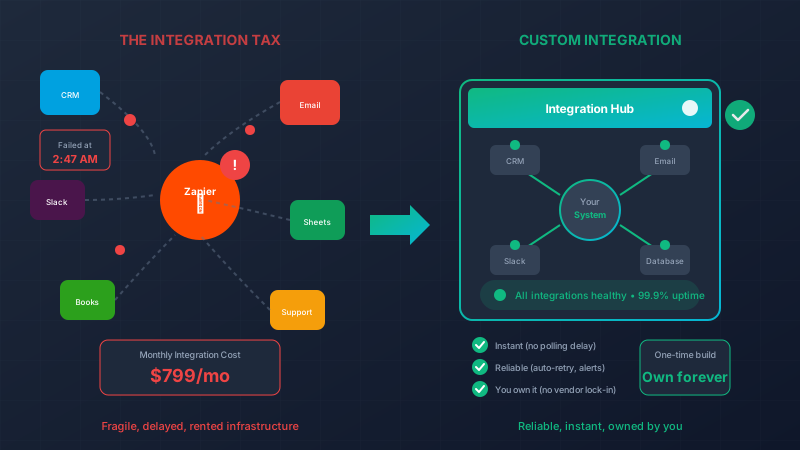
The Integration Tax: What Zapier Really Costs You
“We’ll just connect it with Zapier.”
Famous last words. What starts as a $20/month convenience slowly metastasizes into a fragile web of automated band-aids, each one a potential point of failure you don’t fully understand or control.
Don’t get us wrong—Zapier, Make, and similar tools are genuinely useful for quick prototypes and simple automations. But when they become the connective tissue of your business operations, you’re paying an integration tax that compounds over time.
The Seductive Simplicity
The pitch is compelling: “Connect your apps without code!” And for simple tasks, it works beautifully:
- New form submission → Add to spreadsheet ✓
- New customer in Stripe → Send welcome email ✓
- New lead in CRM → Post to Slack channel ✓
Five minutes to set up, works immediately, feels like magic.
So you add another Zap. And another. And another.
Before you know it, you have 47 Zaps running your business, and nobody quite remembers what all of them do.
The Hidden Costs Emerge
Cost #1: The Subscription Creep
Let’s trace a typical growth curve:
- Month 1: Free tier, 100 tasks/month — $0
- Month 3: Starter plan, 750 tasks — $20/month
- Month 6: Professional plan, 2,000 tasks — $49/month
- Month 12: Team plan, multi-step Zaps — $399/month
- Month 18: Company plan, custom limits — $799/month
You’re now paying $9,588/year for glue code—and you still don’t own it.
Cost #2: The Rate Limit Problem
Zapier doesn’t run instantly. Free plans poll every 15 minutes. Paid plans poll every 1-5 minutes. That means:
- Customer places order at 2:01pm
- Zap checks at 2:05pm
- Fulfillment notification goes out at 2:06pm
- Five minutes of lag, minimum
For some workflows, that’s fine. For others—inventory updates, urgent notifications, time-sensitive processes—those minutes matter.
# What a real-time integration looks like
defmodule OrderWebhook do
  def handle_new_order(order) do
    # Triggered instantly via webhook, not polling
    order
    |> update_inventory()        # Immediate
    |> notify_warehouse()        # Immediate
    |> send_confirmation()       # Immediate
    |> sync_to_accounting()      # Immediate

    # Total time: milliseconds, not minutes
  end
end
Cost #3: The Cascade Failure
It’s 2am. A Zap fails. It was supposed to:
- Detect new orders
- Update inventory
- Create shipping labels
- Notify customers
But step 2 failed because your inventory system was briefly unavailable. Now:
- Inventory is wrong
- No shipping labels were created
- Customers weren’t notified
- Orders from the last 6 hours are in limbo
You discover this at 8am when customers start complaining. Now someone has to:
- Figure out which orders were affected
- Manually process each one
- Hope the inventory counts can be reconstructed
- Apologize to unhappy customers
The failure happened at 2am. The Zap didn’t tell anyone. It just stopped.
Cost #4: The Debugging Nightmare
When a custom integration fails, you have:
- Complete error messages
- Full stack traces
- Log files with context
- The ability to add debugging
When a Zap fails, you have:
- “Task failed”
- Maybe a cryptic error code
- Limited visibility into what actually happened
- No ability to add custom logging
Troubleshooting a complex Zap failure can take hours, and often the “fix” is just to turn it off and on again, hoping the underlying issue resolved itself.
Cost #5: The Logic Limitations
Real business logic is messy. Zapier’s conditional logic is… not.
What you need:
def route_support_ticket(ticket) do
  cond do
    ticket.customer.tier == :enterprise and ticket.priority == :urgent ->
      assign_to(:senior_support)
      notify(:customer_success_manager)
      escalate_to(:management, if: not_responded_in(15, :minutes))

    ticket.customer.lifetime_value > 50_000 ->
      assign_to(:priority_queue)
      notify(:account_manager)

    ticket.category == :billing and ticket.amount_disputed > 1000 ->
      assign_to(:billing_specialist)
      require_approval_from(:finance)

    ticket.is_feature_request ->
      add_to(:product_backlog)
      notify(:product_manager, weekly_digest: true)

    true ->
      assign_to(:general_queue)
  end
end
What Zapier gives you:
- If/else branches that become unreadable after 3 levels
- Limited data manipulation capabilities
- No ability to query other systems mid-flow
- Painful workarounds for anything complex
You end up either oversimplifying your logic or creating a Rube Goldberg machine of multiple Zaps calling each other.
Cost #6: The Vendor Lock-In
Your workflows are trapped in Zapier’s ecosystem. Want to move to Make? Rebuild everything. Want to bring integrations in-house? Rebuild everything. Want to switch one of the connected apps? Hope there’s a compatible Zapier integration.
You don’t own your business logic. You’re renting it.
The 3am Wake-Up Call
Let me tell you about a real scenario (details changed, but the pain was real):
A growing e-commerce company had 60+ Zaps running their operation. One night, Shopify had a brief API hiccup. Several Zaps failed. But they didn’t fail loudly—they failed silently, with orders stuck in various half-processed states.
By the time anyone noticed:
- 47 orders were missing from the fulfillment system
- Inventory counts were off by hundreds of units
- Customer confirmations had gone out for orders that weren’t actually processed
- The website was still selling products they didn’t actually have
Total impact: Three days of cleanup, $23,000 in expedited shipping and refunds, and countless hours rebuilding trust with customers.
The Zapier subscription cost them $400/month. That single failure cost them 5 years of subscription fees.
What Custom Integrations Provide
When you build integrations properly, you get:
Reliability
defmodule OrderProcessor do
  use Oban.Worker, max_attempts: 5

  @impl Oban.Worker
  def perform(%{args: %{"order_id" => order_id}}) do
    order = Orders.get!(order_id)

    case process_order(order) do
      {:ok, result} ->
        Logger.info("Order #{order_id} processed successfully")
        :ok

      {:error, :inventory_unavailable} ->
        # Retry with backoff
        Logger.warn("Inventory check failed for #{order_id}, retrying...")
        {:snooze, 60}

      {:error, reason} ->
        # Alert someone
        Alert.send(:order_processing_failure, %{
          order_id: order_id,
          reason: reason,
          retry_count: attempt()
        })
        {:error, reason}
    end
  end
end- Automatic retries with exponential backoff
- Dead letter queues for persistent failures
- Alerts when something needs human attention
- Complete visibility into what’s happening
Speed
defmodule OrderWebhook do
  def handle(conn, %{"event" => "order.created"} = params) do
    # Process immediately upon receiving webhook
    order = parse_order(params)

    # All downstream actions happen in milliseconds
    {:ok, _} = Inventory.reserve(order.items)
    {:ok, _} = Fulfillment.queue(order)
    {:ok, _} = Notifications.send_confirmation(order)
    {:ok, _} = Analytics.record(order)

    conn |> send_resp(200, "OK")
  end
end
No polling. No delays. Instant.
Debuggability
defmodule OrderProcessor do
  require Logger

  def process(order) do
    Logger.info("Processing order", order_id: order.id, customer: order.customer_id)

    with {:ok, inventory} <- check_inventory(order),
         _ = Logger.debug("Inventory check passed", available: inventory),
         {:ok, fulfillment} <- create_fulfillment(order),
         _ = Logger.debug("Fulfillment created", fulfillment_id: fulfillment.id),
         {:ok, notification} <- send_notification(order) do
      Logger.info("Order processed successfully", order_id: order.id)
      {:ok, order}
    else
      {:error, step, reason} ->
        Logger.error("Order processing failed",
          order_id: order.id,
          step: step,
          reason: inspect(reason)
        )
        {:error, reason}
    end
  end
end
When something fails, you know exactly what, where, and why.
Flexibility
Custom code can do anything. Call multiple APIs. Transform data in complex ways. Make decisions based on any criteria. Handle edge cases gracefully.
def process_order(order) do
  # Logic that would require 17 Zaps and still not work quite right
  order
  |> validate_against_fraud_rules()
  |> apply_customer_specific_pricing()
  |> check_inventory_across_warehouses()
  |> select_optimal_fulfillment_location()
  |> apply_shipping_rules()
  |> generate_customs_documentation_if_international()
  |> calculate_commission_splits()
  |> update_customer_loyalty_points()
  |> trigger_reorder_if_below_threshold()
  |> sync_to_all_downstream_systems()
end
Ownership
Your integrations. Your code. Your infrastructure. If you want to change providers, add features, or modify behavior, you can. You’re not waiting for Zapier to add support for a new app or feature.
The Build vs. Buy Decision
We’re not saying never use Zapier. It has its place:
Use Zapier/Make when:
- Prototyping a workflow before building it properly
- Personal productivity automations
- Low-stakes, low-volume processes
- You genuinely don’t have engineering resources
Build custom integrations when:
- The workflow is core to your business
- Reliability matters
- Speed matters
- The logic is complex
- Volume is high
- You need visibility and control
The Math Usually Favors Custom
Let’s compare costs over 3 years:
Zapier Approach:
- Subscription: $400/month × 36 months = $14,400
- One major failure (conservatively): $10,000
- Staff time managing Zaps: 5 hours/month × $50/hour × 36 = $9,000
- Total: ~$33,400
Custom Integration:
- Initial build: $15,000
- Maintenance: $200/month × 36 months = $7,200
- Failures: Rare and recoverable (included in maintenance)
- Total: ~$22,200
Custom is cheaper. And you own it forever.
Making the Transition
You don’t have to rip out all your Zaps at once. Start strategically:
-
Identify your critical paths — Which automations would hurt most if they failed?
-
Audit failure history — Which Zaps have failed before? What was the impact?
-
Prioritize by complexity — Which Zaps are held together with duct tape and prayers?
-
Build and migrate incrementally — Replace one critical workflow at a time.
-
Keep simple Zaps — Not everything needs to be custom. Low-stakes automation can stay.
What You’ll Gain
When you move from Zapier to custom integrations for your critical workflows:
✅ Reliability — Proper error handling, retries, and alerts
✅ Speed — Real-time webhooks instead of polling delays
✅ Visibility — Full logging and monitoring
✅ Flexibility — Complex logic without workarounds
✅ Ownership — Your code, your control, your data
✅ Predictable costs — No surprise overages or tier bumps
Stop Paying the Integration Tax
Every month you pay for Zapier, you’re renting infrastructure that could be yours. Every Zap that fails at 2am is a liability you accepted. Every workaround for Zapier’s limitations is technical debt accumulating.
The integration tax compounds. The longer you wait, the more dependent you become, and the harder the migration gets.
Let’s talk about which integrations are costing you the most—in money, reliability, and peace of mind. We’ll help you build integrations that work as hard as you do.
Zapier’s tagline is “Easy automation for busy people.” But if you’re busy cleaning up after failed Zaps, maybe easy isn’t the right priority. Reliable is.
Live Demo: Real-Time Inventory
This interactive component demonstrates how we combine Phoenix LiveView for real-time updates with Svelte for smooth client-side interactions. Try it out – in a production app, these changes would sync instantly across all connected users.