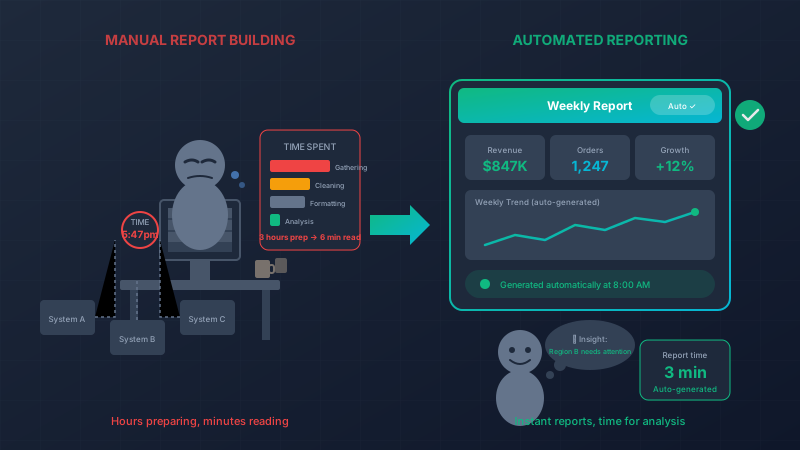
The Reporting Trap: When Preparing Reports Takes Longer Than Reading Them
It’s Friday afternoon. Your operations manager is hunched over a spreadsheet, pulling data from four different systems to create the weekly performance report. Copy. Paste. Format. Cross-reference. Fix a formula that broke. Copy. Paste. Repeat.
Three hours later, the report is ready. On Monday morning, the leadership team will glance at it for about six minutes.
Three hours to create. Six minutes to consume. Something is very wrong with this picture.
The Reporting Tax
In most organizations, skilled professionals spend a shocking amount of time doing something a computer should do: gathering data and putting it into a readable format.
Let’s quantify the damage:
| Report | Frequency | Prep Time | Read Time | Annual Prep Hours |
|---|---|---|---|---|
| Weekly sales report | Weekly | 2 hours | 10 min | 104 hours |
| Monthly financials | Monthly | 6 hours | 30 min | 72 hours |
| Quarterly board deck | Quarterly | 12 hours | 1 hour | 48 hours |
| Weekly ops metrics | Weekly | 3 hours | 15 min | 156 hours |
| Monthly customer report | Monthly | 4 hours | 20 min | 48 hours |
Total: 428 hours per year—more than ten full work weeks—spent preparing reports. And this is a conservative estimate for a small company.
That’s not reporting. That’s a reporting tax on your business.
Where the Time Actually Goes
When we dig into why reports take so long, it’s rarely the analysis. It’s the preparation:
Data gathering (40% of time)
- Log into System A, export CSV
- Log into System B, run query, export
- Wait for System C to load (it’s always slow)
- Copy numbers from email someone sent you
- Find that one spreadsheet on the shared drive
Data cleaning (25% of time)
- Remove duplicates
- Fix date formats (is it MM/DD or DD/MM?)
- Reconcile mismatched names (“ABC Corp” vs “ABC Corporation”)
- Figure out why the numbers don’t match last week
- Chase someone down for missing data
Formatting (25% of time)
- Build pivot tables
- Create charts
- Apply consistent styling
- Make it look “professional”
- Export to PowerPoint
Actual analysis (10% of time)
- Identify trends
- Note anomalies
- Draw conclusions
- Make recommendations
Your highest-paid people are spending 90% of their reporting time on tasks a computer could do instantly.
The Analysis Gap
Here’s the tragic part: because preparation consumes so much time, actual analysis gets shortchanged.
The operations manager who spent three hours building that report? She noticed an interesting pattern in the customer data. She wanted to dig deeper, cross-reference it with marketing campaigns, maybe uncover something valuable.
But it’s already 5pm. The report is due. The interesting pattern will have to wait.
It never gets investigated.
The reporting trap isn’t just wasted time—it’s wasted insight. Your people could be finding opportunities and solving problems, but they’re too busy copying and pasting.
What Automated Reporting Looks Like
Imagine a different Friday afternoon. Your operations manager opens a dashboard:
defmodule WeeklyReportLive do
  use Phoenix.LiveView

  def mount(_params, _session, socket) do
    # Data is always current - no manual refresh
    {:ok, assign(socket,
      sales: Sales.weekly_summary(),
      operations: Ops.weekly_metrics(),
      customer: Customers.weekly_health(),
      trends: Analytics.detected_trends(),
      anomalies: Analytics.flagged_anomalies()
    )}
  end

  def handle_event("generate_pdf", _, socket) do
    # One click to create a formatted report
    pdf = ReportGenerator.weekly_pdf(socket.assigns)
    {:noreply, push_event(socket, "download", %{data: pdf})}
  end
end
The data is already there. Already reconciled. Already formatted. She spends her time on:
- “Hm, that 15% dip in Region B looks unusual. Let me drill down.”
- “These three customers show similar patterns. Worth flagging for sales.”
- “This trend line suggests we should adjust inventory before the holiday.”
The report takes three minutes to generate. She spends an hour on actual analysis. That’s the ratio you want.
The Power of Real-Time Data
When reports are manual, they’re always stale. By the time Friday’s report is ready, you’re looking at Thursday’s numbers (at best).
With automated reporting, you’re looking at right now:
defmodule SalesMetrics do
  def weekly_summary do
    today = Date.utc_today()
    week_start = Date.beginning_of_week(today)

    %{
      # These numbers update in real-time
      revenue: revenue_since(week_start),
      orders: order_count_since(week_start),
      average_order: average_order_value_since(week_start),

      # Comparisons calculated automatically
      vs_last_week: compare_to_last_week(),
      vs_same_week_last_year: compare_to_last_year(),

      # Trends detected automatically
      trending_products: top_movers_this_week(),
      declining_products: declining_this_week()
    }
  end
end
The Monday meeting isn’t looking at last week’s numbers—they’re looking at this morning’s numbers. Decisions are based on current reality, not historical artifacts.
Eliminating the Data Silo Problem
Half the battle in manual reporting is getting data to line up. Your CRM says revenue was $1.2M. Your accounting system says $1.15M. Which is right? Why the difference?
Custom software eliminates this problem by design:
defmodule RevenueCalculator do
  # One source of truth, one calculation
  def total_revenue(date_range) do
    Orders.completed_in_range(date_range)
    |> Enum.filter(&(&1.status == :paid))
    |> Enum.reduce(Decimal.new(0), &add_order_revenue/2)
  end

  defp add_order_revenue(order, total) do
    # Clear, auditable logic
    order_total = order.subtotal
    |> Decimal.add(order.shipping)
    |> Decimal.sub(order.discounts)
    |> Decimal.add(order.tax)

    Decimal.add(total, order_total)
  end
end
Sales report shows $1.2M. Finance report shows $1.2M. Operations dashboard shows $1.2M. Because they’re all calculating from the same data, the same way.
No more “your numbers don’t match my numbers” meetings.
Smart Alerts: The Report That Comes to You
Better than pulling a report: having the report tell you when something needs attention.
defmodule BusinessAlerts do
  use Oban.Worker

  @impl Oban.Worker
  def perform(_job) do
    check_revenue_anomaly()
    check_inventory_levels()
    check_customer_churn_signals()
    check_cost_spikes()

    :ok
  end

  defp check_revenue_anomaly do
    today_pace = Sales.today_pace()
    expected_pace = Sales.typical_pace_for_day()

    if today_pace < expected_pace * 0.7 do
      Alert.send(:revenue_alert, %{
        message: "Revenue tracking 30%+ below typical pace",
        today: today_pace,
        expected: expected_pace,
        suggested_action: "Review order funnel for issues"
      })
    end
  end
end
Instead of waiting for Friday’s report to discover Monday’s problem, the system tells you Monday afternoon. Four days of recovery time you wouldn’t have had otherwise.
Self-Service Reporting: Answer Your Own Questions
The best reporting system isn’t the one that generates perfect pre-defined reports. It’s the one that lets anyone answer their own questions.
defmodule ReportBuilder do
  def build_query(params) do
    base_query()
    |> apply_date_range(params[:date_range])
    |> apply_filters(params[:filters])
    |> apply_grouping(params[:group_by])
    |> apply_sorting(params[:sort_by])
  end

  def available_dimensions do
    [:product, :category, :region, :customer_type,
     :sales_rep, :channel, :time_period]
  end

  def available_metrics do
    [:revenue, :orders, :units, :average_order,
     :margin, :customer_count, :return_rate]
  end
end
The marketing manager wonders how email campaigns performed by region last quarter. Instead of asking someone to build a report, she drills down herself. Three clicks, instant answer.
The sales director wants to see which products are selling better than last year. He builds the comparison view himself. No ticket required.
The Transformation: A Real Example
A distribution company we worked with tracked their reporting burden:
Before (manual Excel-based reporting):
- 3 people spent a combined 25 hours/week on report preparation
- Monthly close took 5 days
- Board meetings used 3-week-old data
- “Ad hoc” requests took 2-3 days to fulfill
- Frequent data reconciliation arguments
After (automated reporting system):
- Same 3 people spend 4 hours/week on reporting (mostly analysis)
- Monthly close takes 1 day
- Board meetings use yesterday’s data
- Ad hoc requests are self-service or same-day
- One source of truth, no reconciliation needed
21 hours per week reclaimed. Those three people now spend their time on financial analysis, strategic planning, and process improvement. You know, the work they were actually hired to do.
Common Reports to Automate
Almost every business has these manual reports hiding in plain sight:
Executive/Board Reporting
- Weekly business summary
- Monthly financial review
- Quarterly board deck
- Annual planning data
Sales & Marketing
- Pipeline reports
- Win/loss analysis
- Campaign performance
- Territory breakdowns
Operations
- Inventory status
- Fulfillment metrics
- Quality reports
- Vendor performance
Finance
- Cash flow reports
- AR/AP aging
- Budget vs. actual
- Cost analysis
HR
- Headcount reports
- Turnover analysis
- Compensation summaries
- Time & attendance
If someone’s spending more than 15 minutes preparing it, it can probably be automated.
Getting Started
You don’t need to automate every report at once. Start with the biggest offenders:
-
Audit your report inventory – List every recurring report. Who makes it? How long? How often?
-
Identify the time sinks – Sort by preparation time. The top 5 are your targets.
-
Map data sources – Where does each report’s data live? What joins are required?
-
Build incrementally – Start with the highest-value report. Prove the concept.
-
Expand the platform – Each automated report makes the next one easier.
Free Your Analysts to Actually Analyze
Your people didn’t study finance, operations, or marketing to become professional copy-pasters. They have skills, training, and intuition that are being wasted on data wrangling.
Automated reporting doesn’t replace your team. It unleashes them to do the work that actually requires human judgment.
The goal isn’t a prettier report. The goal is a smarter business.
Let’s talk about which reports are eating your team’s time. We’ll help you build a system where data flows automatically, insights emerge naturally, and your best people can focus on what they do best.
The best report is the one nobody had to build—because the system built it while they were doing actual work.
Live Demo: Real-Time Inventory
This interactive component demonstrates how we combine Phoenix LiveView for real-time updates with Svelte for smooth client-side interactions. Try it out – in a production app, these changes would sync instantly across all connected users.